
Project Details
An AI tool that builds editable After Effects animations and checks its own work.
- My role
- Product design · Interaction design · Code
- Date
- 2026
- Tools
- Claude Code, OpenAI Codex, After Effects, ExtendScript / JSX, Python
- Outcome
- Roughly 90% less animation rework in repeatable production tasks
Working Demos
Each demo pairs the original reference with the one-pass Mome Flow result.
The later training runs reach roughly 90% visual similarity after a single pass.
Final Result
The completed animation, followed by a frame-by-frame comparison between the reference and the editable Mome Flow result.

Reusable Motion Skills
Saved motion references become reusable starting points for future prompts, implementation rules, and visual direction.
Reference 01
Pinterest ↗Reference 02
Pinterest ↗Reference 03
Pinterest ↗Reference 04
Pinterest ↗Reference 05
Pinterest ↗Reference 06
Pinterest ↗Reference 07
Pinterest ↗Reference 08
Pinterest ↗Reference 09
Pinterest ↗How it was made
How Mome Flow Works
The Product
Mome Flow connects Claude Code, Codex, or Cursor to After Effects. It can study a reference, build an animation, and check the result.
The final After Effects file stays editable. The project also includes safety rules, reusable tools, and tested motion examples.
Why It Exists
A script can fail without showing a useful error. It can also build an animation that looks close but uses the wrong timing.
Mome Flow checks the project before building, uses named controls, and measures the result after the animation runs.
System Components
- Build rules: safe ways to create controls, expressions, and After Effects scenes.
- Case library: reusable prompts, scripts, and before-and-after examples.
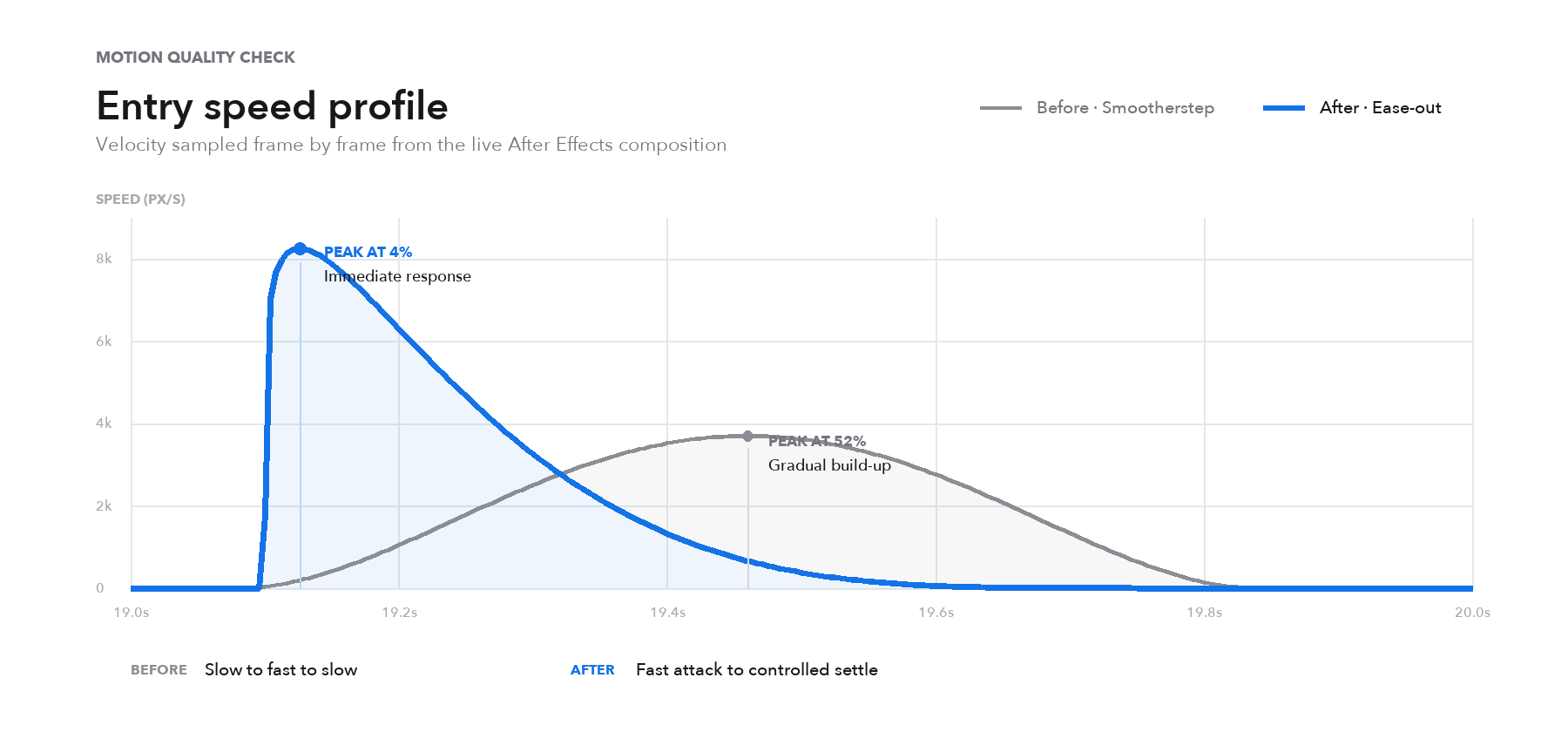
- Check tools: project checks, effect lookup, frame capture, measurement, and speed graphs.
- Learning: useful solutions become recipes, and failures become new safety rules.
Working Principles
- Read the real project settings before building.
- Look up the correct API and effect names.
- Check motion with saved frames and speed graphs.
- Use editable expressions and named controls.
- Change only what is needed, so good timing and layout stay intact.
Process
The Problem
AI can suggest motion ideas, but designers still need an editable After Effects file. One-off scripts are hard to fix, and visual review alone can miss timing problems.
How It Works
The designer shares a brief, reference, or open composition. Mome Flow plans the work, builds named controls and expressions, then captures frames to check the result.
Testing and Learning
I tested the tool on UI motion, type, transitions, and campaign work. Useful solutions become reusable recipes. Failures become safety rules.
Result
In 10+ internal tests, the core rebuild time dropped from about 180 minutes to about 20 minutes. The final animation still stays editable.
How to Use Mome Flow
From finding a reference to building an editable After Effects scene and saving the result as a reusable prompt.
Step 01 · Find a Reference
Search the web for the motion reference you want to recreate, then copy its link.Step 02 · Choose Your Model
Open After Effects, launch Mome Flow, and choose Claude Code, Codex, or Cursor. Follow the link to open the model's chat window.Step 03 · Describe the Recreation
Paste the reference link and ask the agent to recreate the same effect inside After Effects.Step 04 · Analyze Frame by Frame
The agent studies the request, downloads the reference video, and analyzes its motion frame by frame.Step 05 · Build in After Effects
Mome Flow builds the scene in After Effects, creates the animation, and connects the expressions.Step 06 · Keep Every Layer Editable
The animation is complete, and every generated layer remains editable for further refinement.Step 07 · Save a Reusable Prompt
Ask the agent to turn the finished motion scene into a prompt that can be reused for the next project.Reusable Prompt
After each project, Mome Flow saves a prompt with the main measurements, expressions, build rules, and checks.
The next project can reuse it.
Latest Donations · After Effects Rebuild PromptView full prompt
# Rebuild task: the "Latest donations" card-carousel animation in After Effects

You are a motion engineer expert in Adobe After Effects ExtendScript. Your one and only deliverable is **a single complete .jsx script**. The user will run it in AE 2022+ via File > Scripts > Run Script File, and it must build the animation described below from scratch in one shot. Every number in this document comes from frame-by-frame measurement of the original video and from one already-verified successful rebuild — **copy them as-is; do not "improve" them and do not invent elements this document doesn't list**.

## Hard output constraints (read all of them before writing code)

1. **Output exactly one code block** containing the full runnable script. No ellipses, no "repeat for the other five cards" — the six cards MUST be generated by a **for loop over data arrays** (the data below is already loop-friendly), which keeps the script both complete and un-truncatable.
2. **ExtendScript is ES3**: `var` only; no `let/const`, no arrow functions, no template literals, no `Array.map/forEach`, no `JSON.*`. Expression strings run in AE's expression engine (also treat as ES3), and **never put `//` comments inside an expression string**.
3. The script must open with a save guard so no modal dialog can block it:
   `if(app.project.file!==null){app.project.save();}` then `app.newProject();`
4. **Creation order = layer stacking order** (later-created sits on top). Follow the "Layer list" section order exactly.
5. **Create `AI_DONO_CTRL` and each card's own `Slot` / `Tilt Jit` sliders BEFORE assigning that card's expressions** — an expression referencing an object that doesn't exist yet gets silently disabled by AE.
6. **For widgets: set `parent` first, THEN `setPosition`.** In AE, assigning `layer.parent=` preserves world position (AE back-computes local position), so you must assign the parent first and only then call `position.setValue(localCoords)`. Reversed order pins the widget in world space instead of riding its card.
7. Build hearts from "two circles + one diamond" as three Add masks — **never use emoji fonts** (they silently fail to render from scripts). Use `ADBE Brightness & Contrast 2` for the distance dim — **never the Fill effect** (known to white-out entire cards).
8. **Every hold segment needs explicit anchor keyframes at BOTH ends** (flat value, speed 0, influence 20). The keyframe tables below already include these anchors — keep every one of them, otherwise ease handles extrapolate into the hold and the whole deck silently drifts and swings back.
9. End with `app.project.save()` (on a fresh project the first save opens a Save dialog for the user to pick a path — that's normal). Optional: wrap a few `comp.saveFrameToPng()` calls in try/catch to capture frames f10/f44/f80/f125 as acceptance stills (older AE versions lack this API — fail silently).

## The motion model (understand it before copying)

A right-to-left "spotlight conveyor": six square cards spread along a horizontal line; the center seat (744,446) is largest and carries a neon-green border. Each swap advances the **Advance slider by +3**: the featured card exits left, two cards sweep through the center WITHOUT stopping, and the third parks as the new featured card. Each card's seat coordinate is `u = ((Slot - Advance + 3) mod 6) - 3`; the mod-6 wrap means Advance going 0→3→6 lands back on the initial arrangement — a seamless 161-frame loop. All motion (position / scale / tilt / opacity / brightness) is computed live by expressions; timing lives entirely in the 12 keyframes on one Advance slider on `AI_DONO_CTRL`.

## Comp spec

- Comp name `DonoCarousel_ref`, **1496×924, 30 fps, duration 5.36667 s (161 frames)**, `comp.motionBlur=true`, background color `[0.9922,0.9961,1.0]`.
- Time conversion: this document speaks in frame numbers f; in JSX use `t=(f-1)/30`.
- All pixel values assume 1496×924; for any other size, scale everything proportionally.

## Layer list (create in THIS order; totals: 1 Null + 6 text + 13 solids)

1. `BG` solid 1496×924, color `[0.9922,0.9961,1.0]`
2. (Optional) reference guide layer: if the user supplies a reference-video path, importFile it, then `guideLayer=true`, Scale 200%, Opacity 50, locked — the house rule for any replication is to overlay the reference and compare frame-on-frame
3. Six text layers (see Text table): `header`, `date`, `capA_name`, `capA_sub`, `capB_name`, `capB_sub`
4. `AI_DONO_CTRL`: Null (`enabled=false`), add an `ADBE Slider Control` renamed **Advance**
5. `featured_border` solid 500×500, color `[0.8667,0.9529,0.2667]`, position `[744,446]`, masked with the 500/R46 iOS round-rect
6. `card_s0`…`card_s5` — the six cards (loop-generated; see Card system)
7. `bubble0`, `bubble1`, then `heart0`, `heart1`, `heart2` (see Widget tables)

## Text table (font "Helvetica-Bold", fall back to "ArialMT" in a catch around setValue; ink=[0.118,0.118,0.125], gray=[0.478,0.478,0.502])

| Layer | Content | Size | Color | position | Justification |
|---|---|---|---|---|---|
| header | Latest donations | 56 | ink | [116,84] | LEFT_JUSTIFY |
| date | 04/24 | 40 | ink | [1348,82] | RIGHT_JUSTIFY |
| capA_name | Daniel Petersen | 32 | ink | [763,788] | CENTER_JUSTIFY |
| capA_sub | $100 donation   •   10m ago | 31 | gray | [763,832] | CENTER_JUSTIFY |
| capB_name | Amy Stockton | 32 | ink | [763,788] | CENTER_JUSTIFY |
| capB_sub | $200 donation   •   11m ago | 31 | gray | [763,832] | CENTER_JUSTIFY |

(The sub-line separator is "three spaces + • + three spaces". Set text via TextDocument: `resetCharStyle()` first, then fontSize/fillColor/font/justification, `applyStroke=false`.)

## Card system (the heart of the motion)

Each card: `addSolid(color, "card_sN", 484, 484, 1)` → apply the 484/R39 iOS round-rect mask → add two Slider Controls (names must be exact): **Slot**=N and **Tilt Jit**=value from the table → add `ADBE Brightness & Contrast 2` → `threeDLayer=true; motionBlur=true` → assign the 6 expressions → add `ADBE Drop Shadow` (Opacity 38, Direction 180°, Distance 8, Softness 40).

| Card | Color [r,g,b] | Hex | Tilt Jit |
|---|---|---|---|
| card_s0 | [0.2824,0.2863,0.9725] | #4849F8 | 5 |
| card_s1 | [0.9294,0.9137,0.5255] | #EDE986 | 5 |
| card_s2 | [0.5765,0.6706,0.8510] | #93ABD9 | 7 |
| card_s3 | [0.9490,0.3804,0.6118] | #F2619C | 5 |
| card_s4 | [0.6706,0.7686,1.0000] | #ABC4FF | 7 |
| card_s5 | [0.9059,0.7451,0.9725] | #E7BEF8 | 9 |

### The six expressions (embed VERBATIM; only the quotes need JSX string escaping)

Position:
```
var c=thisComp.layer("AI_DONO_CTRL");var A=c.effect("Advance")(1);var s=effect("Slot")(1);var m=(s-A+3)%6;if(m<0){m+=6;}var u=m-3;var au=Math.abs(u);var sg=u<0?-1:1;function it(ar,q){var i=Math.floor(q);var f=q-i;if(i>=ar.length-1){return ar[ar.length-1];}return ar[i]*(1-f)+ar[i+1]*f;}var q=au<1?au*2:au+1;var DX=[0,120,234,306,384,420];var dx=it(DX,q);var pp2=(A%3)/3;var B2=Math.sin(Math.PI*pp2);if(au>=1.5){dx=dx*(1-B2*0.18);}[744+sg*dx, 446, au*30]
```
Scale:
```
var c=thisComp.layer("AI_DONO_CTRL");var A=c.effect("Advance")(1);var s=effect("Slot")(1);var m=(s-A+3)%6;if(m<0){m+=6;}var u=m-3;var au=Math.abs(u);function it(ar,q){var i=Math.floor(q);var f=q-i;if(i>=ar.length-1){return ar[ar.length-1];}return ar[i]*(1-f)+ar[i+1]*f;}var wu=u<0?au*1.5:au;var q=wu<1?wu*2:wu+1;var SB=[484,472,350,304,224,224];var eff=it(SB,q);var pp=(A%3)/3;var B=Math.sin(Math.PI*pp);if(au<1.6){eff=eff+B*Math.max(0,472-eff)*Math.max(0,1-au/1.6);}else{eff=eff*(1-B*0.28);}var sc=eff/4.84;[sc,sc,100]
```
Rotation (Z Rotation):
```
var c=thisComp.layer("AI_DONO_CTRL");var A=c.effect("Advance")(1);var s=effect("Slot")(1);var m=(s-A+3)%6;if(m<0){m+=6;}var u=m-3;var au=Math.abs(u);var sg=u<0?-1:1;var j=effect("Tilt Jit")(1);sg*Math.abs(j)*Math.min(au,1)
```
Opacity:
```
var c=thisComp.layer("AI_DONO_CTRL");var A=c.effect("Advance")(1);var s=effect("Slot")(1);var m=(s-A+3)%6;if(m<0){m+=6;}var u=m-3;var au=Math.abs(u);au>2.6?Math.max(0,100-(au-2.6)*250):100
```
Brightness on `ADBE Brightness & Contrast 2` (property 1):
```
var c=thisComp.layer("AI_DONO_CTRL");var A=c.effect("Advance")(1);var s=effect("Slot")(1);var m=(s-A+3)%6;if(m<0){m+=6;}var u=m-3;var au=Math.abs(u);Math.min(au,1.3)*26
```
Contrast on the same effect (property 2):
```
var c=thisComp.layer("AI_DONO_CTRL");var A=c.effect("Advance")(1);var s=effect("Slot")(1);var m=(s-A+3)%6;if(m<0){m+=6;}var u=m-3;var au=Math.abs(u);-Math.min(au,1.3)*14
```

Key ideas: position z = `au*30` gives physical occlusion (3D sorting, not layer order); in Scale, `wu=u<0?au*1.5:au` is the 1.5× accelerated shrink on the exit side; `B/B2 = sin(π·(A mod 3)/3)` is the transition bulge factor (the passing card swells to ~470 while stack cards shrink by ×(1−B·0.28)).

## iOS continuous-curvature round-rect masks (copy the arrays verbatim; four-arc bezier approximations are forbidden)

All masks: `Masks.addProperty("Mask")` + `new Shape()`, set `vertices/inTangents/outTangents`, `closed=true`, then `property("ADBE Mask Shape").setValue(shape)`.

**Card 484×484, R=39** (superellipse n≈3.257 sampled at 28 vertices, pre-expanded):
```
vertices=[[0,59.592],[1.255,33.606],[5.038,20.657],[11.424,11.424],[20.657,5.038],[33.606,1.255],[59.592,0],[424.408,0],[450.394,1.255],[463.343,5.038],[472.576,11.424],[478.962,20.657],[482.745,33.606],[484,59.592],[484,424.408],[482.745,450.394],[478.962,463.343],[472.576,472.576],[463.343,478.962],[450.394,482.745],[424.408,484],[59.592,484],[33.606,482.745],[20.657,478.962],[11.424,472.576],[5.038,463.343],[1.255,450.394],[0,424.408]]
inTangents=[[0,0],[-1.113,8.6],[-1.874,4.088],[-2.646,2.646],[-3.402,1.559],[-4.46,0.577],[-8.672,0],[0,0],[-8.6,-1.113],[-4.088,-1.874],[-2.646,-2.646],[-1.559,-3.402],[-0.577,-4.46],[0,-8.672],[0,0],[1.113,-8.6],[1.874,-4.088],[2.646,-2.646],[3.402,-1.559],[4.46,-0.577],[8.672,0],[0,0],[8.6,1.113],[4.088,1.874],[2.646,2.646],[1.559,3.402],[0.577,4.46],[0,8.672]]
outTangents=[[0,-8.672],[0.577,-4.46],[1.559,-3.402],[2.646,-2.646],[4.088,-1.874],[8.6,-1.113],[0,0],[8.672,0],[4.46,0.577],[3.402,1.559],[2.646,2.646],[1.874,4.088],[1.113,8.6],[0,0],[0,8.672],[-0.577,4.46],[-1.559,3.402],[-2.646,2.646],[-4.088,1.874],[-8.6,1.113],[0,0],[-8.672,0],[-4.46,-0.577],[-3.402,-1.559],[-2.646,-2.646],[-1.874,-4.088],[-1.113,-8.6],[0,0]]
```
**Border frame 500×500, R=46**:
```
vertices=[[0,70.288],[1.481,39.638],[5.942,24.365],[13.474,13.474],[24.365,5.942],[39.638,1.481],[70.288,0],[429.712,0],[460.362,1.481],[475.635,5.942],[486.526,13.474],[494.058,24.365],[498.519,39.638],[500,70.288],[500,429.712],[498.519,460.362],[494.058,475.635],[486.526,486.526],[475.635,494.058],[460.362,498.519],[429.712,500],[70.288,500],[39.638,498.519],[24.365,494.058],[13.474,486.526],[5.942,475.635],[1.481,460.362],[0,429.712]]
inTangents=[[0,0],[-1.313,10.144],[-2.21,4.821],[-3.121,3.121],[-4.012,1.839],[-5.26,0.681],[-10.228,0],[0,0],[-10.144,-1.313],[-4.821,-2.21],[-3.121,-3.121],[-1.839,-4.012],[-0.681,-5.26],[0,-10.228],[0,0],[1.313,-10.144],[2.21,-4.821],[3.121,-3.121],[4.012,-1.839],[5.26,-0.681],[10.228,0],[0,0],[10.144,1.313],[4.821,2.21],[3.121,3.121],[1.839,4.012],[0.681,5.26],[0,10.228]]
outTangents=[[0,-10.228],[0.681,-5.26],[1.839,-4.012],[3.121,-3.121],[4.821,-2.21],[10.144,-1.313],[0,0],[10.228,0],[5.26,0.681],[4.012,1.839],[3.121,3.121],[2.21,4.821],[1.313,10.144],[0,0],[0,10.228],[-0.681,5.26],[-1.839,4.012],[-3.121,3.121],[-4.821,2.21],[-10.144,1.313],[0,0],[-10.228,0],[-5.26,-0.681],[-4.012,-1.839],[-3.121,-3.121],[-2.21,-4.821],[-1.313,-10.144],[0,0]]
```
Circle-mask helper (ES3, drop into the script verbatim):
```
var K=0.55228475;function circ(cx,cy,r){var kr=K*r;return {v:[[cx+r,cy],[cx,cy+r],[cx-r,cy],[cx,cy-r]],i:[[0,-kr],[kr,0],[0,kr],[-kr,0]],o:[[0,kr],[-kr,0],[0,-kr],[kr,0]]};}
```

## Keyframe tables (time is always `t=(f-1)/30` seconds; nothing is omitted — copy every key)

**AI_DONO_CTRL → Advance** (12 keys; each key gets symmetric in/out `new KeyframeEase(speed, influence)`; influence 20 where speed is 0, else 33. Clear first with `while(p.numKeys>0){p.removeKey(1);}`):

| f | 1 | 30 | 36 | 44 | 52 | 61 | 111 | 117 | 125 | 133 | 142 | 161 |
|---|---|---|---|---|---|---|---|---|---|---|---|---|
| value | 0 | 0 | 0.534 | 1.686 | 2.583 | 3.0 | 3.0 | 3.534 | 4.686 | 5.583 | 6.0 | 6.0 |
| speed | 0 | 0 | 3.60 | 3.42 | 1.98 | 0 | 0 | 3.60 | 3.42 | 1.98 | 0 | 0 |

**featured_border → Opacity** (snaps off during the swap, breathes back on after docking):
f1:100 → f31:100 → f36:0 → f57:0 → f76:100 → f111:100 → f116:0 → f137:0 → f156:100 → f161:100

**Caption opacity cross-fades**:
- capA_name and capA_sub (identical keys): f1:100, f31:100, f39:0, f111:0, f119:0, f141:0, f153:100, f161:100
- capB_name and capB_sub: f1:0, f50:0, f62:100, f111:100, f119:0, f161:0

**bubble0 / bubble1** (green bubble = 1-second pre-announce before each swap): 92×92 solid, color `[0.867,0.953,0.267]`, `circ(46,46,46)` mask, **parent to the host card first, then** `position.setValue([322,268])` (card-local coords):
- bubble0 → parent `card_s0`: Scale f25:[0,0] → f28:[116,116] → f30:[100,100] → f42:[100,100] → f46:[0,0]; Opacity f25:0 → f28:78 → f42:78 → f46:0
- bubble1 → parent `card_s3`: same key shape shifted to f105/f108/f110/f122/f126 (Opacity likewise)

**heart0-2** (double heart pop + one faint heart, all parented to `card_s3`): 100×100 solid, color `[0.839,0.157,0.314]`, three masks = `circ(34,38,24)` + `circ(66,38,24)` + diamond `v=[[50,26],[76,52],[50,92],[24,52]]` (all tangents zero), `maskMode=MaskMode.ADD`:

| Layer | position | Scale keys (f:value) | Opacity keys |
|---|---|---|---|
| heart0 | [198,246] | 57:0 → 60:70 → 62:56 → 84:56 → 88:0 | 57:0 → 58:100 → 84:100 → 88:0 |
| heart1 | [398,16] | 63:0 → 66:95 → 68:76 → 84:76 → 88:0 | 63:0 → 64:100 → 84:100 → 88:0 |
| heart2 | [300,420] | 70:0 → 73:72 → 75:58 → 84:58 → 88:0 | 70:0 → 71:55 → 84:55 → 88:0 |

(Widget scales use the "overshoot to 116%, settle back" pop feel; linear interpolation is fine — the frame spacing already carries the feel.)

## Pre-output self-check (the model MUST verify every line)

- [ ] Solid count 13 (BG 1 + border 1 + cards 6 + bubbles 2 + hearts 3), text 6, Null 1; Advance has exactly 12 keys, border exactly 10
- [ ] Six cards come from a loop; the six expressions match this document character-for-character (especially the `DX/SB` arrays and the constants `0.18/0.28/1.5/1.6/2.6/250`)
- [ ] Every hold is bracketed by speed-0 anchor keys; every widget sets parent before position
- [ ] No let/const/arrow functions/template literals anywhere; no `//` inside expression strings
- [ ] Save guard on line one, save at the end

## User acceptance (check frame-by-frame after running)

- f10: Neon Blue card docked at center, green border ON, side stacks taper symmetrically, caption Daniel Petersen / $100
- f44: a large card (Blueberry Milk) is passing through center, border OFF, no captions, Lemon card shrinking out on the left
- f80: Raspberry Rose is the new featured card, border ON, three hearts on the card, caption Amy Stockton / $200
- f125: mid-point of the second swap (Soft Lilac in transit), mirror of the f44 state
- f161 matches f1 exactly ⇒ seamless loop

## Optional adaptations

- **Real photos**: replace a card's addSolid with imported footage (or place the photo above the card using the card as an alpha matte); keep the mask/sliders/expressions untouched; scale footage to cover 484×484.
- **Colors / names / date**: touch only the color table and text table; never the expressions.
- **Re-timing**: touch only the 12 Advance keys (keep the anchor–anchor–three-slope-keys–anchor structure); everything else follows automatically.
Download prompt .txt ↗
Measured QA
Across more than ten comparable reference-rebuild cases, Mome Flow reduced core reconstruction time while frame sampling and speed-curve analysis kept the faster output measurable and reviewable.
| Measure | Before | Mome Flow | Impact |
|---|---|---|---|
| Measured sample | Comparable rebuilds | 10+ cases | Repeated workflow evidence |
| Core reconstruction time | ~180 min / case | ~20 min / case | ~89% less time |
| Reconstruction throughput | 1x baseline | ~9x | ~9x faster |
Approximate working averages from 10+ internal project cases. Results vary with reference complexity, asset readiness, and refinement scope.